Sync your
WordPress
without
overwriting
anyone
ix-wp-envsync keeps a WordPress site in step across local, staging and production. It pushes only what the team changed, keeps what the client changed and shows a plan before anything moves.
- push local
- respect the remote
- remote wins
A WordPress plugin that syncs local, staging and production with a three-way compare
Co-authored with Yojahny Chavez, maintained by two since September 2026
Freelance work on mixed hosting (Hostinger, IONOS, Plesk, Coolify), no SSH on production
Open source on GitHub, GPL-2.0 or later, version 0.9.22
Three versions, one decision
Comparing just two sites cannot say who changed what. So every pull stores a baseline, a fingerprint of the site at that moment, and every diff compares three versions: the baseline, local and the remote (staging or production).
Pull before push
Without a baseline only two sides can be compared, and the plugin says so instead of guessing.
Prod wins
If the team and the client changed the same row, production's version is kept and the local edit is not applied.
Conflicts in plain sight
Each conflicting row or file is listed by name, to review before every push.
Files like rows
An edited theme file goes up. A plugin that auto-updated on production stays as it is.
Pick what happened to one row on local and on the remote, and the plan shows which version survives. They are the same rules as the list, one by one.
What changed on each side?
- 01You changed a row, production did notPushed
- 02Production changed a row, you did notKept, not touched
- 03You both changed the same rowProduction wins, reported as a conflict
- 04You created a rowInserted
- 05You deleted a row, production did not touch itDeleted
- 06Production deleted or changed it, you deleted itKept
One laptop, one client
The site the commands run from is the hub and needs WP-CLI. Every remote, usually production or staging, needs only the plugin and a token. Requests are signed and the token never travels.
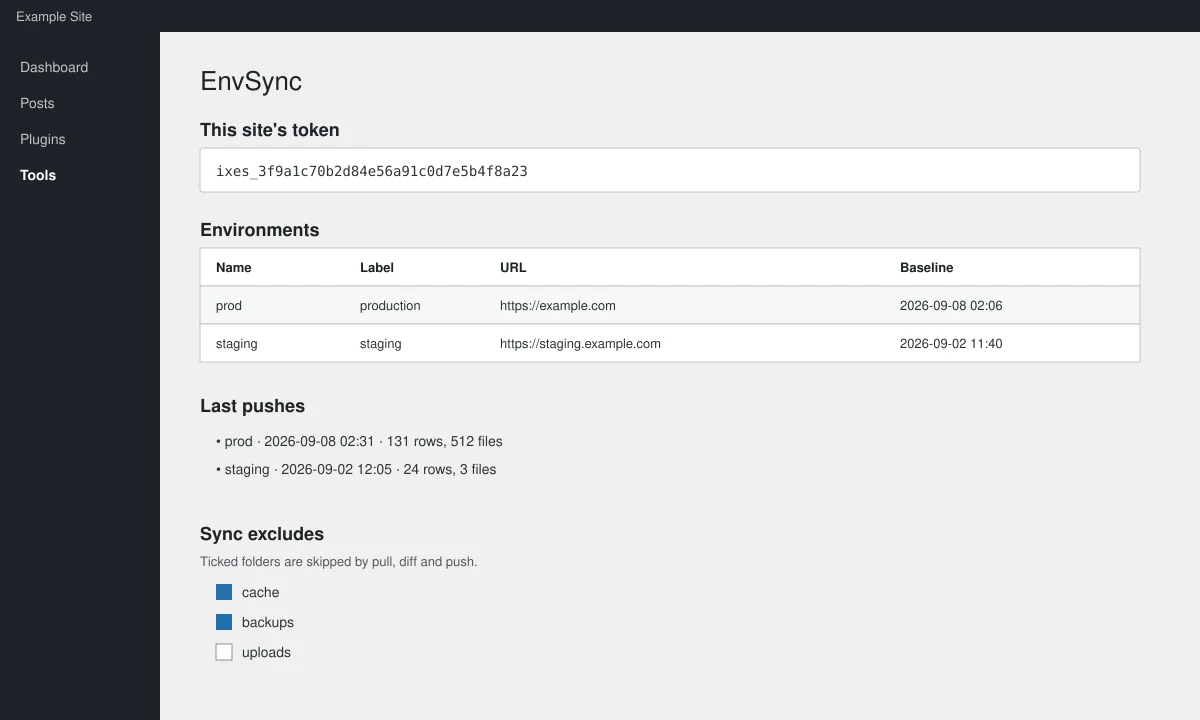
- Site tokenThe one copied into the hub to register this site as a remote.
- EnvironmentsName, label, URL and baseline of each registered remote.
- Last pushesWhen each environment was pushed to, and how many rows and files.
- Sync excludesTicked folders (here cache and backups) are skipped by pull, diff and push.
Five commands, no surprises
- 01
Status
Says where each site stands and which command comes next
- 02
Pull
A fresh copy of production, and the baseline is recorded
- 03
Diff
A preview of what would change. It only reads and counts, nothing moves
- 04
Push
Shows the plan and asks to confirm. The remote keeps a pre-push copy;
--dry-runwrites nothing - 05
Rollback
If something looks wrong, restore the pre-push copy. What the client changed is kept
If a push dies half-way, unlock releases the lock without undoing anything.
On a fresh WordPress install, status recommends push --force --dry-run before sending anything.
One row, one column
The diff reads and counts, it changes nothing. Each row lands in one column only. The terminal below is the plugin’s real output, with example data; it is selectable and copyable. Hovering a column, or tapping a note, highlights what it counts.
$ wp envsync diff prod
prod ← local
baseline: 2026-09-08 02:06
512 files · 38.4 MB · 131 rows
DATABASE
+-------------+------+--------+--------+-------------+-------------+-------+
| table | push | insert | delete | remote-wins | kept-remote | same |
+-------------+------+--------+--------+-------------+-------------+-------+
| wp_posts | 12 | 3 | 1 | 2 | 39 | 611 |
| wp_postmeta | 87 | 19 | 4 | 0 | 310 | 8904 |
+-------------+------+--------+--------+-------------+-------------+-------+
PLUGINS
+-----------------------+-------+--------+-----------------+----------+
| plugin | files | size | version | active |
+-----------------------+-------+--------+-----------------+----------+
| polylang | 535 | 9.8 MB | 3.6.1 → 3.7.0 | stays on |
| wp-mail-smtp | 875 | 7.2 MB | — → 4.4.0 | turns on |
+-----------------------+-------+--------+-----------------+----------+
THEMES
+--------------+-------+--------+---------+--------+
| theme | files | size | version | active |
+--------------+-------+--------+---------+--------+
| mk-adventure | 14 | 0.3 MB | 1.4 | active |
+--------------+-------+--------+---------+--------+
OTHER FILES
+---------------+-------+---------+
| folder | files | size |
+---------------+-------+---------+
| uploads/2026/ | 88 | 21.1 MB |
+---------------+-------+---------+
CONFLICTS (prod wins)
wp_posts #2231 Services
plan saved: …/plans/plan-prod-20260908-020644.json
manifest: …/plans/diff-prod-latest.jsonInstall in 3 steps
It installs as one more plugin on each site and runs from WP-CLI.
Plugin on every site
Upload the plugin zip in Plugins → Add New → Upload and activate it, on the local site and on every remote.
The remote’s token
On each remote, open Tools → EnvSync and copy the token shown there.
Register and check
On the local site (the hub), register the remote and check the connection.
statussays whether it works and which command comes next.
Start with a staging site. The first diff changes nothing.
Got a project in mind?
Tell me what you need. I reply within 24 hours and, if it is a fit, you get a fixed written proposal.